Bring your history · free

Switch without
starting over.

Your sleep, runs and weigh-ins arrive through Apple Health the moment you connect it. Your lifting, food and old running archive come from your old apps' export files, read on your phone.

Free · no account · nothing uploaded

Fullday's first run, Your day, today: from 52 nights of sleep and 60 days of heart data in Apple Health, Recovery 91%, Strain 5.7 with an aim of 14–18 and Sleep 92, each with the reading behind it.
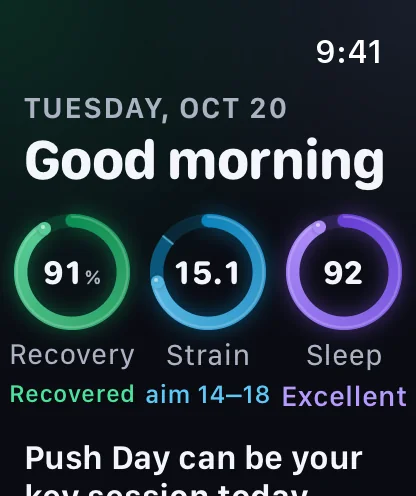
Fullday on Apple Watch, at the top of its one scroll: Good morning, then three rings, Recovery 91% Recovered, Strain 15.1 with an aim of 14–18, and Sleep 92 Excellent; then Push Day can be your key session today.

Already in Apple Health

Nothing to export.

If your old app or device saved it to Apple Health, Fullday reads it on first open, so your first scores start from your own normal, not from zero.

Your sleep ring's or band's app saves your nights to Apple Health, and that's where Fullday reads them: no sleep export file needed. Recovery without a band

Sleep and recovery

Your nights, overnight HRV and resting heart rate. The first run reads the last 60 days to set your own normal.

Free
Runs, rides, walks and hikes

The past year's, with their routes when the app that recorded them shares them.

Free
Weigh-ins and steps

Weigh-ins from the past year, steps from the last 60 days.

Free
Food totals

Past days' calories and macros other apps saved, as one total for each app and day, from the last year up to yesterday. Tap Food from Apple Health.

Free

From an export file

Three steps, years of history.

  1. Export from your old app. Look in its settings for Export, then save the file to Files.
  2. Open it in Fullday. Me → Your data → Import from another app, or Import workout files.
  3. Check, then import. Fullday shows what's in the file first: the workouts, meal totals and weigh-ins, the units, and which exercise each one becomes.

Importing the same file again won't add anything twice.

Your old workout log

Its CSV export: every finished workout, set by set, with warm-ups, drop sets, RPE, notes and supersets. Exercise names are matched to Fullday's 232, or kept as your own. Body weight too, if you export your measurements.

Free
Your calorie counter's export

Day by day, one total per meal: calories, protein, carbs and fat, with fiber, sugar, sodium and more. Your weigh-ins too.

Free
Your old running app's archive

The full archive ZIP: every run, ride, walk and hike with its route, heart rate, cadence and power, and the totals you saw there. A big one can stop and carry on where it left off.

Free
Your watch's workout files

.fit, .gpx or .tcx, many at once, a folder or a ZIP, or a watch account's full export. Or share a workout straight to Fullday from the watch's app.

Free

What doesn't come across

  • Saved routines and templates. Your finished workouts do.
  • Food names: a calorie counter's export holds each meal's totals, not the foods in it.
  • Swims, yoga and other sports in an archive or workout files. They're counted, not brought in.
  • An archive's photos and comments.
  • Sleep export files. Your nights come from Apple Health instead.
  • A password-protected download. Some apps only export on a paid plan.

Read on your phone

  • Files are read on your device. Nothing is uploaded, and there's no old account to sign in to.
  • Imported runs and rides, with their routes and heart rate, stay on that device only: not in iCloud.
  • Imports aren't written to Apple Health, unless you turn on Also save to Apple Health for workout files.
  • Change your mind: Delete Imported Activities takes every imported run, ride, walk and hike off the device. The file you imported from isn't touched.

More in the privacy promise.

On Android: the same imports, with Health Connect in place of Apple Health. Your history in Fullday Wrapped

Questions about bringing your history.

Is importing free?

Yes. Apple Health, export files and workout files are all free, with no account and no time limit.

Which apps can I import from?

Anything that saves to Apple Health, with nothing to export. Files: the CSV exports of two popular lifting apps and of a popular calorie counter, a popular running app's full archive, and .fit, .gpx and .tcx files from any watch's app. The import screen in the app shows how to export from each.

Will I get duplicates?

No. A workout Fullday already has, recorded there, imported before or in Apple Health, isn't added again, and importing the same file twice adds nothing.

Do my scores have to start from zero?

No. On first open Fullday reads the last 60 days of sleep, HRV and resting heart rate from Apple Health, so your first Recovery and Sleep scores are against your own normal. They're estimates for general wellness, not medical advice.

How long does a big archive take?

It depends on its size; an archive of years can be several gigabytes. You can leave the import screen and it keeps going while Fullday is open. If it stops, choose the same file again and it carries on.

The Fullday app icon

Bring your years with you.

Coming to the App Store this December. Apple Health, export files and workout files are free.

Coming soon to the App Store Android coming to Google Play