Programs and routines
5×5, Push · Pull · Legs, Upper/Lower, Full Body, Dumbbells Only and Bodyweight Basics. The first program and 3 routines are free; every program and unlimited routines come with Pro.
Train · logging is free
Start your routine on your wrist and log each set with last time's numbers already filled in, with a rest timer that taps you when it's time. The phone can stay in your locker. On iPhone, one tap logs a set.
Free: logging, 3 routines, the first program, the watch app, the Lock Screen timer · Pro: records, every program, the calculators

On Apple Watch
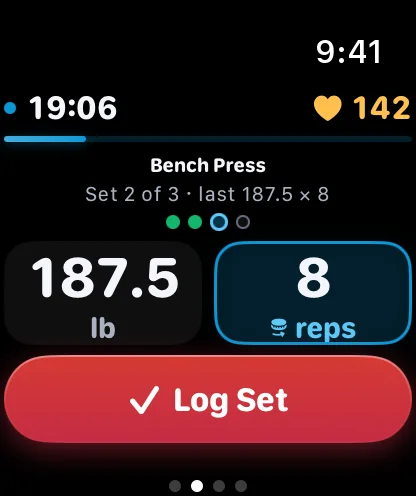
With your iPhone out of reach, the watch builds the session itself from your routine and logs it on its own.
Each exercise opens with what you lifted last time, the sets shown as dots. Adjust the weight and reps with the Digital Crown, then Log Set.
It starts as you log a set, taps your wrist as rest runs out, and takes −15 or +15 seconds.
The session is saved to Apple Health from the watch as a strength workout, with heart rate and energy.
The workout reaches your iPhone when it's back in reach, and it's never saved twice.
Say "Start a workout in Fullday" or "What did I do last time in Fullday" to Siri. Apple Watch with watchOS 11 or later: Series 6 and later, SE 2nd generation, every Ultra.
On iPhone
Between sets, the rest timer sits on your Lock Screen and in the Dynamic Island, with the next set on it.

−15, +15 and Log set, right on the Live Activity, without unlocking.
Pair exercises, and note how hard each set felt.
Pair any standard Bluetooth strap to your iPhone for heart rate in strength sessions too.


232 exercises and six programs, from 5×5 to Bodyweight Basics. Routines you make on the phone are on your wrist too.
5×5, Push · Pull · Legs, Upper/Lower, Full Body, Dumbbells Only and Bodyweight Basics. The first program and 3 routines are free; every program and unlimited routines come with Pro.
Lifting records, progression suggestions, plate and warm-up calculators, a muscle map of what you've trained lately, and your full history.
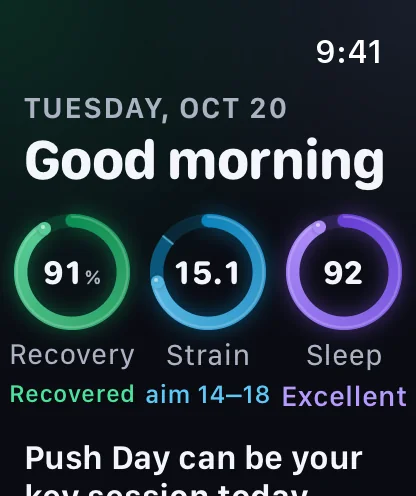
Last night's sleep, your overnight HRV and yesterday's strain show how hard today can be. The scores are free; the coaching on them is Pro. How recovery works
Bring your history · free
Export the CSV file from the lifting app you used before, save it to Files, and choose it under Me → Your data → Import from another app.
Every session, set by set, and your body weight too if you export your measurements.
The file is read on your iPhone; nothing is uploaded.
Importing the same file again won't add anything twice.
Fullday reads the exports of two popular lifting apps today. Which apps? Runs and rides come in as .fit, .gpx or .tcx files. Everything you can bring

Yes. Start your routine on the watch and it runs the whole session itself: last time's numbers filled in, sets logged with the Digital Crown, the rest timer and heart rate. The workout is saved to Apple Health and reaches your iPhone when it's back in reach.
Yes, free. On the watch it taps your wrist as rest runs out. On iPhone it sits on the Lock Screen and in the Dynamic Island with −15, +15 and Log set, so you can log the next set without unlocking.
Yes, free. Fullday reads the CSV exports of two popular lifting apps on your phone, with body weight if you export your measurements too. Nothing is uploaded, and importing the same file twice adds nothing. The support page lists the apps.
Logging, 3 routines, the first program, the Lock Screen rest timer and the watch app are free, with no time limit. Fullday Pro adds unlimited routines, every program, lifting records, progression suggestions, the calculators and the muscle map: $59.99 a year with a 7-day free trial, $9.99 a month, or $179.99 once.

Coming to the App Store this December. Strength logging, the watch app and the Lock Screen timer are free.
Pre-orders open soon.
Email us for a note when they open