
Apple Watch, widgets and Siri
On your wrist, your Lock Screen, and in Siri.
Fullday is built for Apple's own places: an Apple Watch app that works with the phone at home, complications, widgets, Live Activities, Shortcuts and Spotlight. All of them free.
FREE everything on this page · Apple Watch with watchOS 11 or later (Series 6 or later, SE 2nd generation, every Ultra)
Apple Watch
Leave the phone at home.
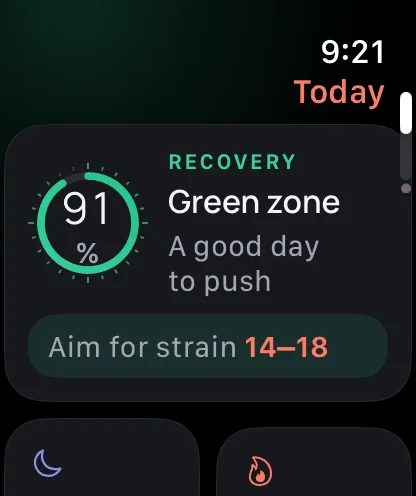
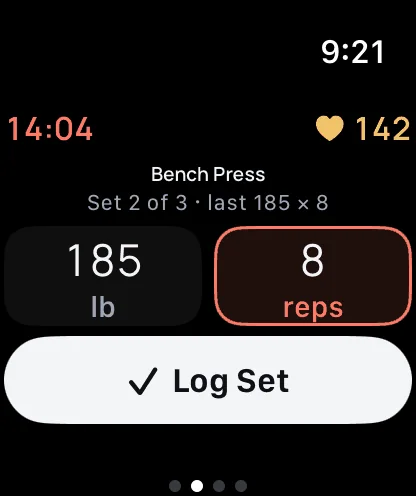
Your morning scores are worked out on the watch itself. Lift, run and ride without your iPhone, and it all lands in the same history when you're back.
- Morning scores
Recovery, Strain and Sleep, worked out on Apple Watch, with the strain to aim for.
- Strength without the phone
Your routine on your wrist, last time's numbers filled in, and Log Set.
- GPS runs and rides
Record with the watch alone: splits, heart-rate zones and auto-pause. Follow a saved route with turn cues (Pro).
- Say what you ate
Dictate a meal and your iPhone finds the foods. Supplements, fasting and weight too.
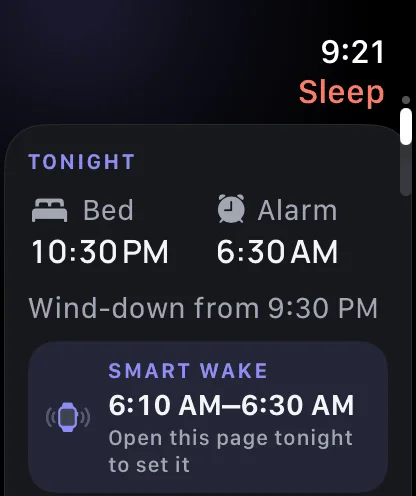
- Smart wake
A 10, 20 or 30-minute window before your alarm; the watch wakes you when you start to stir.
Widgets and Live Activities
Your day, without opening the app.
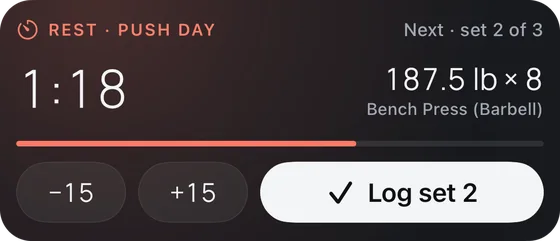
Widgets for Readiness, the sleep score, Nutrition, Water, Training, Check-in, Sleep and Today, on the Home Screen and the Lock Screen. Live Activities for rest timers, runs and rides, wind-down, and wake and nap alarms.
- Rest timer with Log set
On the Lock Screen and in the Dynamic Island, with −15 and +15.
- Complications
Recovery, Sleep, Training and Water on your watch face, in thin rings.

Siri, Shortcuts and Spotlight
Just say it.
Ten App Shortcuts work with Siri and the Shortcuts app, with no setup. Spotlight finds your routines, saved routes and your own foods by name, on your phone, and you can turn that off.
- Log Greek yogurt in Fullday
- Scan a product in Fullday
- How's my recovery in Fullday
- Start a workout in Fullday
- Start a run in Fullday
- Log water in Fullday
- Log my weight in Fullday
- What did I do last time in Fullday
- Going to bed in Fullday
- I'm awake in Fullday
The ten shortcuts are Log Food, Scan a Product, How's My Recovery?, Start Workout, Start a Run, Log Water, Log Weight, Last Time, Going to Bed and I'm Awake. Fullday runs on iPhone and iPad with iOS 17 or later; versions for Mac and Apple Vision Pro are planned for later.

Made for Apple Watch.
Fullday is coming to the App Store this December. The watch app, widgets and Siri are free.
Hear when Fullday is out
We'll tell you when pre-orders open and when Fullday is on the App Store. Nothing else, and no tracking.
Pre-orders open soon: get it on the App Store.
There's no mailing list yet. To hear from us when it's out, email support@getfullday.app and we'll write back when pre-orders open.
More of Fullday
-
Train
One tap logs a set, with last time's numbers filled in. Programs, supersets and a rest timer you can use from the Lock Screen.
Free: 3 routines, the first program, the Lock Screen timer
Explore Train -
Run
Runs, rides, walks and hikes with GPS on iPhone, or on Apple Watch with the phone at home. Segments, your heatmap, plans.
Free: GPS, sensors, records, segments, heatmap
Explore Run -
Eat
Brand-name foods and restaurant menus on your phone, a product score out of 100, voice logging and AI meal photos.
Free: the food log, scanning and the product score
Explore Eat -
Sleep
A sleep score that explains itself, smart wake on Apple Watch, a night screen, sleep sounds and snoring detection.
Free: the score, smart wake, night screen, four sounds
Explore Sleep -
AI & tech
AI meal-photo estimates and Ask your coach, with Claude by Anthropic, and the on-device tech that does the rest.
Pro, with 3 free AI meal photos a week
Explore AI & tech